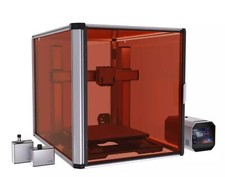
The harsh reality: When you bring the Snapmaker Artisan 3D printer into your home, you'll quickly face the question of whether the high price and the manufacturer's promises actually hold up. One of the biggest problems many users encounter is calibration. If you think the Snapmaker Artisan is a plug-and-play device, you'll soon find out otherwise. Fine-tuning the print bed can become a test of patience, especially if you expect smooth prints without warping and layer shifts. The build volume of 230 x 250 x 260 mm can also limit your creativity if you're planning large-scale projects.
The Tech Deep Dive
The Snapmaker Artisan is a modular 3-in-1 printer that not only handles 3D printing but also milling and laser engraving. The switch between the modules is mechanically interesting, but often fiddly in practice. The 3D printer operates with a dual-extruder system. On the technological side, it scores with a direct drive extruder, which is particularly suitable for flexible filaments like TPU. However, the direct drive also brings the risk of more retract issues. PETG tends to string if you don't play precisely with the retract settings. The nozzle is made of brass by default, which is sufficient for most filaments but wears out quickly with abrasive materials. An upgrade to hardened steel is recommended if you want to work with filaments like carbon fiber-filled PLA.
The printer offers a maximum speed of 100 mm/s, with 60 mm/s being the realistic upper limit for high-quality prints. The resolution is at 50 microns, which is sufficient for most applications but doesn't match the precision of specialized resin printers. The noise level of the printer is another point: at around 50 decibels, it's not exactly quiet, and the fans rattle during longer print jobs like an old tractor.
Worst-Case Scenario
In practice, users report a growing number of clogged nozzles and filament jams. These problems are often due to moist filament getting stuck in the mechanics. Especially with hygroscopic materials like nylon or PETG, you need to be cautious. Another common issue is the first layer lifting, which is usually due to insufficient bed adhesion. The Snapmaker Artisan uses a PEI-coated print bed that works well at temperatures of 60 - 70 degrees for PLA, but at higher temperatures for PETG (220 degrees and above), the material sticks like crazy and can damage the PEI if removed improperly.
The Workshop Fix
Here are a few tips that can save you frustration:
- Avoid moist filaments: Store your filaments in a dry box with silica gel. Wet filament leads to bubbling and poor print results.
- Optimize bed adhesion: For PETG, slow down the first layer to about 20 mm/s and increase the bed temperature to 80 degrees. A layer of Magigoo or a glue stick can work wonders.
- Fine-tune retract settings: With direct drive, start with a retract of 1 mm and a speed of 30 mm/s to minimize stringing.
Straight Talk Evaluation
The Snapmaker Artisan is worth it for you if you're looking for an all-around device and are willing to invest time in learning and calibrating the various modules. However, for pure 3D printing, there are more specialized and simpler solutions available. If you only want to print, mill, or laser occasionally and don’t have time for extensive settings, you should steer clear. Especially beginners might feel overwhelmed by the complexity and quickly lose interest.